Where U (Location Track)1.0
Publisher Description
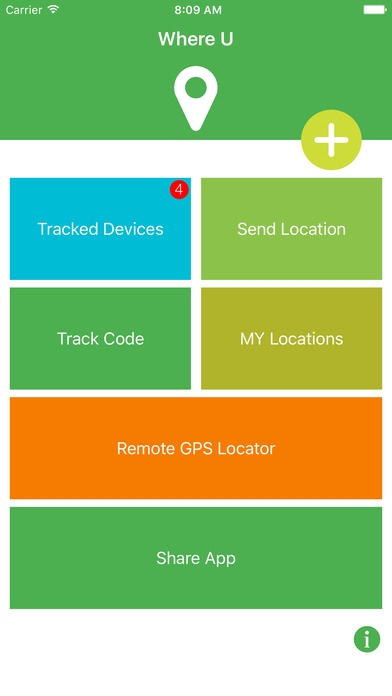
Where U is a tool for recording, sharing and locating your friends or family phone location. with this app you can get your family location at any time. when they not install Where U App, you can know their location by send sms or email via Remote GPS Locator.
Share your location with your favorite loves, and keep you informed their latest location.
How to use where u track your love's device location?
1, install where u in your device, and your love's device.
2,open app in your love's device, click track code button, then you will see a QRCode
3,open app in your device, click plus("+") button, scan QRCode on your love's device and follow her device.
then you will see her location devices location
4.after that you can see your love's location updates whenever her location update. via Tracked Device ==> Her Device ==> Location List
How to use where u track your love's location when her not install app ?
1 open where U Click Remote GPS Locator
2 choose locate by sms or others and send her a message.
3 when she open the link and allow gps location for you. her location will pass to you.
4. see location records for location info.
How to see my location updates and records.
1 Click My Locations Button then your can see all your location updates and records.
App Use Disclaimer:
Where U require the persistent use of real-time location updates while the app is in the background; Continued use of GPS running in the background can dramatically decrease battery life.
Requires iOS 8.0 or later. Compatible with iPhone, iPad, and iPod touch.
About Where U (Location Track)
The company that develops Where U (Location Track) is Baojian Gu. The latest version released by its developer is 1.0.
To install Where U (Location Track) on your iOS device, just click the green Continue To App button above to start the installation process. The app is listed on our website since 2016-09-08 and was downloaded 38 times. We have already checked if the download link is safe, however for your own protection we recommend that you scan the downloaded app with your antivirus. Your antivirus may detect the Where U (Location Track) as malware if the download link is broken.
How to install Where U (Location Track) on your iOS device:
- Click on the Continue To App button on our website. This will redirect you to the App Store.
- Once the Where U (Location Track) is shown in the iTunes listing of your iOS device, you can start its download and installation. Tap on the GET button to the right of the app to start downloading it.
- If you are not logged-in the iOS appstore app, you'll be prompted for your your Apple ID and/or password.
- After Where U (Location Track) is downloaded, you'll see an INSTALL button to the right. Tap on it to start the actual installation of the iOS app.
- Once installation is finished you can tap on the OPEN button to start it. Its icon will also be added to your device home screen.
